Avatar World Face and Expressions: Full Customization Guide!
Avatar World face and expressions are the most overlooked parts of the entire customization system. Most players spend 90 seconds picking a face that looks fine and move on to hair and outfits. That is a missed opportunity, because the face is what gives your character a genuine identity, and the expressions are one of the most powerful storytelling tools in the game.
This guide covers every face customization option available in Avatar World, how the expression system works, when and how to change expressions during gameplay, and how to use both features intentionally to make your avatar feel like a real character rather than a default model.
Why Face Customization Matters More Than Most Players Think?
You can swap outfits in seconds. You can change your hairstyle at the salon. But the face your avatar carries is what every other player and every NPC in the game interacts with in every scene.
A well-designed face creates immediate character identity. When you enter a location, your avatar’s face tells a story before any roleplay action happens. A composed, slightly serious face reads as a doctor or a professional. A bright, open face reads as a student or a creative character. A more angular, cool-toned face reads as a fashion-forward city type.
Getting the Avatar World face customization right at the creation stage pays dividends across every session you play with that character.
Accessing Face Customization
You access face customization from two points in the game.
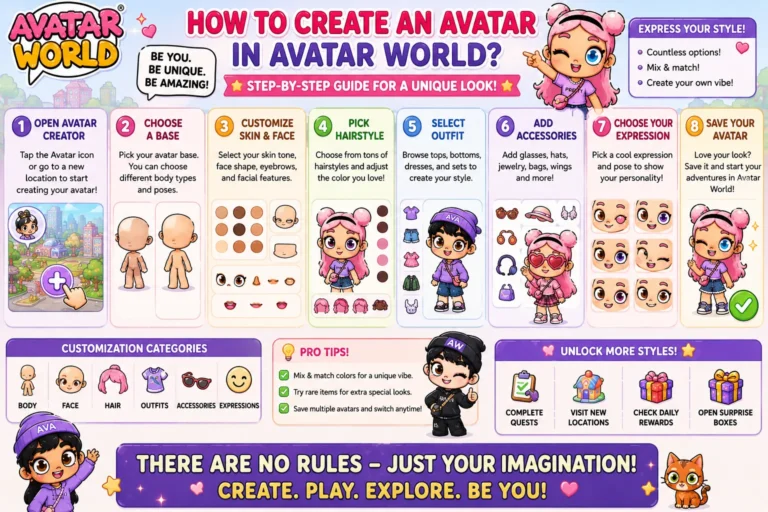
During initial avatar creation: The face step comes directly after gender and skin tone selection. This is when you first design your character’s features before entering the game.
From the customization menu at any time: Tap your avatar’s icon on the main screen to open the full customization menu. Navigate to the face section, and you can edit any feature on your existing character at any point in the game.
Changes to your face are free. You can experiment without spending any AW coins.
Every Face Feature Explained
Eyes
Eye shape is the single most defining feature in Avatar World face design. The options range from large and rounded to narrower and more angled.
Large round eyes create an expressive, warm character. These read as friendly and approachable in any scene. They work especially well for younger characters, school roleplay scenarios, and characters with cheerful personalities.
Medium almond-shaped eyes are the most versatile option. They read as neither too soft nor too sharp and work across all character types and scenes.
Smaller or more angular eyes create a cooler, more composed character face. These work well for professional characters, fashion-forward avatars, and any character type that you want to read as slightly reserved or confident.
Eye position: Some face customization versions let you adjust the vertical and horizontal position of the eyes on the face. Moving them slightly higher creates a more childlike appearance. Centering or lowering them creates a more adult and serious-looking character.
Eyebrows
Eyebrows do more visual work than any other single face feature. They signal emotion, personality, and character type simultaneously.
Thick, straight brows create a grounded, assertive character. These read as self-assured and direct.
Thin, arched brows create a more expressive and sometimes dramatic character. High arches communicate surprise and openness. Lower arches with a sharp point communicate intensity.
Straight medium-thickness brows are the most neutral option. They do not push the character’s personality in any strong direction, which makes them the most versatile choice if you are not sure what character type you want to build.
Brow color usually links to your hair color automatically in Avatar World, but some versions let you adjust it independently. Matching brows to hair creates a cleaner, more cohesive look. Intentionally mismatching them creates a more dramatic character with higher visual contrast.
Nose
Nose customization is subtler than eyes and brows, but still shifts the overall character balance meaningfully.
A smaller, narrower nose pushes visual emphasis upward toward the eyes. The face reads as more delicate, and the eye detail becomes the dominant facial feature.
A broader, more defined nose creates a stronger, more distinctive face overall. The character looks less idealized and more grounded as a result.
Tip: Do not default to the smallest nose option just because it looks fine in isolation. A slightly larger nose often creates a more interesting and more distinctive character face when everything else comes together.
Mouth
The mouth shape affects two things: the character’s default expression and the overall tone of the face.
Upturned mouth corners make the character look naturally friendly, even in a neutral expression. These are the most common default choices.
A straight-set mouth creates a more composed and neutral character. The face reads as thoughtful rather than warm.
Fuller lips create a more expressive mouth that reads clearly in both close-up screenshots and at the standard camera distance during regular play.
Thinner or smaller lips create a subtler mouth that puts more visual weight on the eyes and brows.
Face Shape
Where available in the Avatar World face customization system, the face shape slider or options let you adjust between rounder and more angular facial structures.
Rounder face shapes read as younger and softer. Best for school-age characters and creative, playful personalities.
More angular or defined face shapes read as older and more composed. Best for professional characters, adult family members, and any character you want to read as mature.
Skin Tone and Its Relationship to Face Design
Skin tone in Avatar World is selected before the face customization step, but it is worth revisiting how it affects your overall face design choices.
The game offers a wide range of skin tones from very light to very deep. This range is one of the more thoughtfully designed aspects of Avatar World’s creator, as noted in independent reviews of the game, including Avatar World’s official Play Store page.
Light skin tones work especially well with darker eye and brow combinations that create strong facial contrast.
Medium skin tones are the most versatile and pair equally well with both natural and fantasy-colored hair and eyes.
Deeper skin tones create the strongest visual impact with rich, saturated colors in outfits and accessories. The face reads with particular clarity against bold clothing choices.
The Expression System: How It Works
Avatar World expressions are separate from your face design. Your face design is the static structure of your character. Expressions are the emotional state your avatar displays during gameplay.
The available expressions typically include:
- Happy: An open, smiling expression. The most commonly used default.
- Neutral: A composed, resting expression. No specific emotion signaled.
- Sad: Downturned mouth, softer eyes. Creates an immediately different character energy.
- Angry: Furrowed brows, set jaw. Creates a sharp, intense character impression.
- Surprised: Wide eyes, slightly open mouth. Creates a reactive, expressive character look.
- Shy or embarrassed: A softer version of happy with a slightly averted quality.
Additional expressions may be available depending on your game version and any expression packs released in updates.
How to Change Expressions Mid-Game
You can switch your avatar’s expression at any time through the customization menu without leaving your current location.
This is one of the most underused features in Avatar World. Most players set a default expression during character creation and never change it. Players who actively switch expressions during roleplay sessions create significantly more dynamic and visually interesting characters.
How to use expression changes during gameplay:
Open the avatar customization menu while inside a location. Navigate to the expressions section. Select the emotion that fits your current scene. Close the menu and continue the roleplay.
The expression switch takes less than 15 seconds, and it completely changes how your character reads in the scene.
Using Expressions for Better Roleplay Storytelling
The Avatar World expression system is a storytelling tool. Here is how to use it intentionally across different roleplay scenarios.
School Roleplay
Start the day with a happy expression for your student character arriving at school. Switch to a surprised or shy expression when the teacher calls on them unexpectedly. Use neutral for study and concentration moments. Sad for a difficult scene with a friend. The expression changes build a character arc within a single session.
Hospital Roleplay
A doctor character works best in neutral during work scenes. Compassionate roleplay moments warrant switching to sad or soft expressions. A crisis scene benefits from a focused, slightly intense expression. The expression changes signal what kind of moment is happening without any dialogue.
Family Roleplay
Morning at home is happy and neutral alternating. A conflict scene between characters calls for sadness or anger. A celebration or reunion scene is full happy. Matching an expression to a scene moment creates natural emotional rhythm in the story.
Fashion and Mall Roleplay
For a fashion-forward character, neutral or slightly cool expressions work better than constant happiness. The composed look reads as more stylish and intentional.
Fantasy and Adventure Roleplay
Surprised is underused in adventure scenarios where it should be among the most active expressions. Use it for discoveries, revelations, and moments of wonder. Angry or intense for confrontation scenes. Happy for triumphant moments.
For more on how to build full roleplay stories across multiple scenes, see our Avatar World roleplay ideas guide.
Face and Expressions in the Photo Studio
The photo studio location in Avatar World is where face and expression choices have the most visible impact. When you are setting up a photo shoot for your avatar, the expression you choose for that moment is what defines the shot.
Best expressions for photo studio use:
- Happy: The safest and most universally readable expression for standard portraits
- Neutral: Creates a more editorial, fashion-forward shot. Works especially well with styled outfits
- Surprised: Adds energy and movement to a shot. Works best for outdoor or action-adjacent scenes
- Sad or soft: Creates a more moody, atmospheric portrait. Works well with darker color palettes and more dramatic outfit choices
Switch your expression deliberately before each photo studio session, the same way you change your outfit before entering a location.
Building Face and Expression Cohesion Across Your Avatars
If you use multiple avatar slots, the most effective approach is to give each character a distinct face and expression identity that you maintain consistently.
Avatar 1 example: Angular eyes, straight brows, neutral default expression. This character reads as composed and professional.
Avatar 2 example: Larger round eyes, arched brows, happy default expression. This character reads as warm and expressive.
Avatar 3 example: Medium almond eyes, thick straight brows, surprised expression. This character reads as curious and reactive.
When each avatar has a consistent face and expression identity, switching between characters for different roleplay scenarios feels intentional rather than arbitrary.
For the full guide on creating each of these characters from scratch through every customization step, see our Avatar World avatar creation guide.
And for pairing each character type with the right hairstyle, our Avatar World hairstyle guide covers which styles work best for each character identity.
Getting Full Access to All Face Options
Some premium face features and expression packs in Avatar World require AW coins or a Pazu Plus subscription. The Avatar World MOD APK unlocks every face customization option, expression, and premium feature from the moment you install. You get the complete creator experience without any purchases or subscriptions.
Final Thoughts
Avatar World face and expressions are the foundation of every character you build in the game. The face creates identity. The expressions create storytelling. Together, they are a part of avatar customization that has the most impact on how immersive and meaningful your roleplay sessions feel.
Spend real time on face design. Switch expressions deliberately during gameplay. Use the expression system as a storytelling tool rather than a one-time setting. The difference between a generic avatar and a genuine character in Avatar World often comes down entirely to the two minutes you invest in these steps.