How To Build a House in Avatar World: The Complete Step-by-Step Guide!
One of the best parts of Avatar World is that your home belongs entirely to you. You decide every room, every piece of furniture, every wall color, and every decoration. But if you have ever opened the home builder and felt unsure where to start, you are not alone.
This guide walks you through everything you need to build a house in Avatar World from scratch, including how the builder works, which rooms to set up first, how to place furniture properly, and how to turn a bare apartment into a home that actually reflects your character.
I have built dozens of homes across multiple avatars in this game, and the tips here come from genuine experience with what works and what does not.
How Does the Avatar World Home Builder Work?
Before placing a single piece of furniture, you need to understand the home builder system.
Your home in Avatar World is a private space separate from the city. No other characters can enter unless you invite them through the in-game phone. Everything inside is yours to arrange.
To access the home builder, tap the edit or build icon when you are inside your home. This switches the view into decoration mode, where you can place, move, rotate, and remove furniture freely.
The zoom feature, added in the January 2026 update by Pazu Games, changed home building significantly. You can now pinch to zoom on mobile or use the scroll wheel on PC for much more precise furniture placement. If you have not used this since the update, it is worth revisiting rooms you built before it arrived.
Drag and drop is how all furniture placement works. Tap any item from your inventory, drag it to the position you want, and release. A green indicator means the placement is valid. A red indicator means the item is overlapping something else or outside the valid placement zone.
Rotation is available for most furniture pieces. After selecting an item, look for the rotate icon to spin it 90 degrees at a time. Getting rotation right is what separates a natural-looking room from one where everything lines up too rigidly.
What Furniture Is Available for Free?
You do not need AW coins or a Pazu Plus subscription to build a fully furnished home. The free furniture catalog covers every essential room type.
Free furniture includes:
- Basic beds, sofas, and chairs
- Kitchen appliances and dining tables
- Bathroom fixtures
- Bookshelves, desks, and storage units
- Standard floor lamps and ceiling lights
- Basic rugs and planters
Premium furniture includes:
- Designer-style statement pieces
- Specialty items for themed rooms
- Seasonal decoration items from event updates
- High-detail decorative objects
The free catalog is more than enough to build a complete, well-furnished home. Premium pieces add visual richness and variety, but they are not required to create something that looks genuinely good.
Step 1: Start With Your Room Layout
Before placing any furniture, decide how many rooms your home will have and what each one is for.
The most functional home layouts in Avatar World are built around a clear room structure. You do not need a room for everything from day one. Start with the rooms your roleplay scenarios actually use.
The core four rooms every Avatar World home needs:
Bedroom: The starting point for morning routine roleplay and the room most players set up first. A bed, bedside tables, a wardrobe or mirror, and a soft rug are all you need for a complete bedroom.
Kitchen and dining area: The most active room for family and everyday roleplay. A stove, fridge, dining table, and chairs are the functional minimum. Add a kitchen counter and small appliances to make it feel like a real kitchen.
Living room: The social center of the home. A sofa, coffee table, television or entertainment unit, and a rug. This room works for relaxed conversations, family evenings, and casual friend visits.
Bathroom: A smaller room, but one that adds completeness to any home tour or morning routine scene. A sink, toilet, bathtub or shower, and mirror are the essentials.
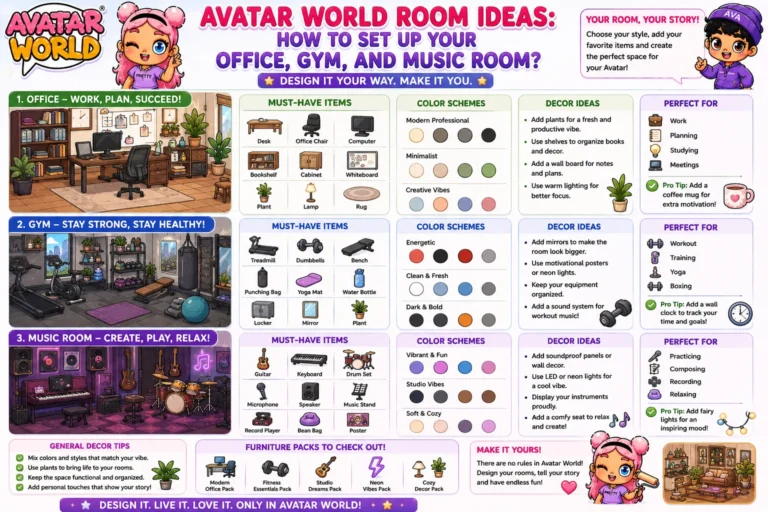
For specific room setup guides covering offices, gyms, and music rooms, see our Avatar World room ideas guide.
Step 2: Choose Your Wallpaper and Flooring First
This is the step most players skip and then regret. Furniture should be chosen after wallpaper and flooring, not before.
Your walls and floors set the color palette for the entire room. If you place furniture first and then add wallpaper, you will almost always find that the wallpaper clashes with pieces you have already committed to.
How to set wallpaper and flooring:
In decoration mode, look for the wallpaper and floor icons in your builder menu. Select the room you want to apply them to and choose from the available options. Both wallpaper and flooring are applied per room, so each space in your home can have its own distinct look.
Practical color coordination rules:
Light walls make small rooms feel larger. Dark walls create a cozier, more intimate feel. Warm-toned flooring pairs with wood and earth-tone furniture. Cool-toned flooring pairs with modern, minimal, or metal-accented pieces.
Set a wall and floor combination you like before touching a single piece of furniture, and the furniture selection process becomes much easier.
Step 3: Place Large Furniture First
Once your walls and floors are set, start with the largest furniture pieces in each room.
The largest item in any room is the anchor point that everything else organizes around.
- In the bedroom, the bed is the anchor
- In the living room, the sofa is the anchor
- In the kitchen, the dining table is the anchor
- In a home office, the desk is the anchor
Place the anchor piece first, position it where it looks right against the wall or in the center of the space, and then build the rest of the room around it. This approach prevents the common mistake of filling a room with smaller items first and then having nowhere logical to put the large statement pieces.
Step 4: Fill In With Medium and Small Pieces
After anchoring each room with the large item, add medium-sized pieces that support it.
Bedroom: Bedside tables on each side of the bed, a wardrobe or dresser across from it, and a mirror nearby. A desk in the corner if your character is a student or professional type.
Living room: Coffee table in front of the sofa, an end table or lamp beside it, the television unit facing the sofa at a natural viewing distance. A bookshelf on a side wall.
Kitchen: Counter units along the walls, stove and fridge placed logically next to each other, dining table positioned where it has clear space around it for chairs.
Once medium pieces are in place, fill remaining gaps with small decorative items: plants, picture frames, books, small lamps, and decorative objects. These are the finishing details that make a room feel lived-in rather than staged.
Step 5: Use Decoration Items to Add Personality
The difference between a furnished room and a home that feels personal comes down to decorative items.
Plants and greenery: Available in several sizes and styles. A large floor plant in a living room corner instantly adds life to a space. Small potted plants on kitchen counters and bathroom shelves add detail without taking up much room.
Picture frames and wall art: Wall decorations break up blank wall space and create visual interest between furniture pieces. Position them at eye level relative to your furniture, not floating randomly on empty wall sections.
Books and small objects: Placed on bookshelves, desks, and side tables. These are the smallest decoration items, but they create the feeling of a room that is actually used rather than just arranged for display.
Rugs: One of the most impactful decoration items in the game. A well-placed rug ties all the furniture in a room together visually. Position it so the front legs of your main seating pieces sit on or near the edge of the rug.
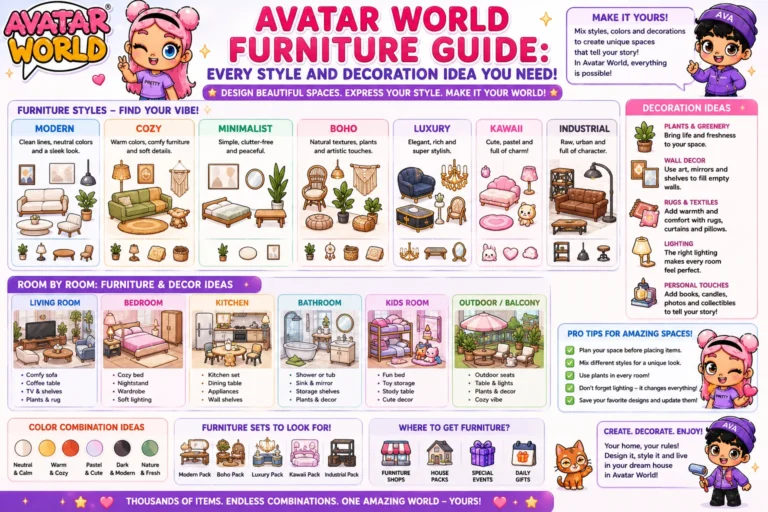
For a full breakdown of every furniture style and decoration category available in Avatar World, see our Avatar World furniture guide.
Step 6: Create a Consistent Style Across Your Home
The homes that look the best in Avatar World are not the ones with the most furniture. They are the ones with a consistent visual style across every room.
Pick one design direction before you build and stick to it throughout.
Modern minimal: Clean lines, neutral colors, few decorative objects, open floor space. White or light grey walls, wood or concrete-style flooring, and sleek furniture with no excessive detail.
Cozy and warm: Rich warm tones, layered textures, lots of soft furnishings. Dark wood furniture, warm-toned rugs, plants everywhere, warm lighting.
Fantasy and creative: Bold colors, unusual furniture combinations, decorative items that tell a story. Mismatched but intentional. More personality than coherence.
Realistic suburban: Practical furniture choices, neutral tones, rooms that mirror real-life home layouts. The goal is believability over visual drama.
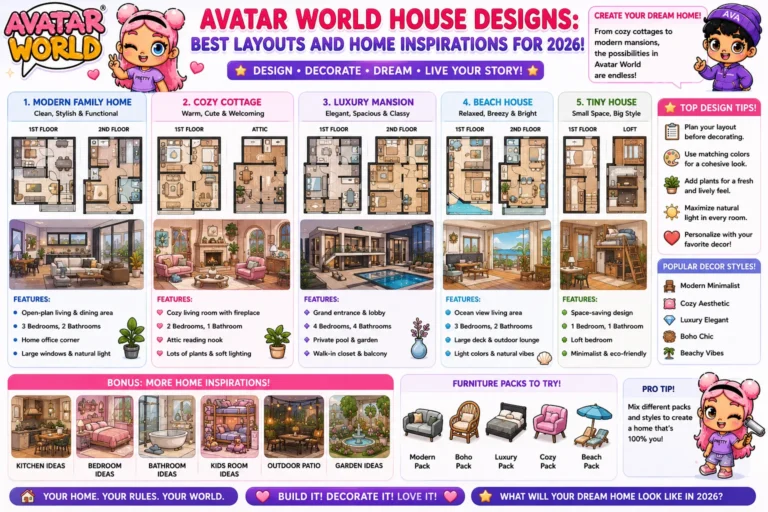
For layout inspiration across all of these styles, see our Avatar World house designs guide.
Common Home Building Mistakes to Avoid
Overcrowded rooms. More furniture does not mean a better-looking room. Leave breathing space between pieces. A room with five well-chosen items looks better than a room crammed with fifteen.
Ignoring scale. Large furniture in a small room feels claustrophobic. Small furniture in a large room feels sparse. Match the size of your pieces to the size of your space.
Mismatching styles. A modern sofa next to a rustic wooden table next to a fantasy-styled lamp creates visual noise. Every piece in a room does not need to be identical, but they should belong to the same general aesthetic direction.
Placing everything against the walls. Real rooms have furniture pulled away from walls to create functional zones. In Avatar World, pulling your sofa forward and your coffee table in front of it creates a more natural-looking living area than pushing everything to the edges.
Skipping wallpaper and flooring. Default walls and floors make even great furniture look underdeveloped. Always set these first.
How to Reset Your Home and Start Fresh?
If your home has accumulated pieces over time and no longer feels cohesive, you can reset it and rebuild from scratch.
In decoration mode, look for the clear room or reset option. This removes all placed furniture and returns items to your inventory. Your items are not deleted. They go back to your collection, ready to be placed again.
Resetting and rebuilding with a clearer plan almost always produces a better result than continuing to adjust a home that was built without a direction in mind.
Accessing All Furniture Without Spending Coins
If you want the full furniture catalog available immediately without earning coins or subscribing to Pazu Plus, the Avatar World MOD APK unlocks every furniture piece, decoration item, wallpaper, and flooring option from installation. Every premium item is available from day one.
For coin-based strategies that help you earn furniture faster through standard gameplay, our Avatar World tips and tricks guide covers the most efficient methods.
Final Thoughts
The best homes in Avatar World are built with a plan. Decide your room layout and style direction before you place a single piece. Set your walls and floors first, anchor each room with its largest piece, and fill in with purpose rather than at random.
Your home is the one space in the game that is entirely yours. Take the time to build a house in Avatar World that actually feels like the character who lives in it.